Following the Flow
Tracing What Programs Actually Do
Try explaining tea-making to someone who has never witnessed the ritual. You could say “make tea,” but that’s as useful as the iconic life advice “Don’t be poor” - technically a complete instruction, yet utterly and tautologically unhelpful.
You’re writing a recipe for a robot chef. The robot has access to every ingredient in the world, every kitchen tool ever invented, and infinite patience. But it will do nothing unless you tell it exactly what to do, in exactly the right order. “Make soup” produces nothing. “Boil water, add vegetables, simmer for 20 minutes” produces soup. The robot doesn’t improvise, even though your AI will.
Imagine directing traffic at a complex intersection. You can’t just shout “figure it out!”
The computer is traffic control for a billion operations per second.
The Core Idea
Say hello to sequential execution - it forms the bedrock of all programming. What’s that? You feel like you already know them and have so much in common like doing one thing after another? Highly likely.
Computers are extraordinarily fast at being remarkably literal. You’re about to become fluent in reading the thoughts of an entity that understands nothing, but does so at billions of operations per second. When you encounter code, whether your past self wrote it, AI generated it, or a colleague left it behind, your first task is to trace what it actually does. Not what it should do. Not what someone hoped it would do. What it actually does, line by line, decision by decision.
Why Tracing Matters (Especially With AI)
When AI generates code, it is very confident, regardless of if the program is right or wrong. It can write you matching tests too. You can never really know unless you verify that the code does what you asked for. This chapter teaches you to follow the flow of information. You don’t need to write control structures from scratch (though you’ll learn that too), but at minimum you need to read them with confidence. Read on to be able to look at a page of code and trace the computer’s path through it.
The Default Path: One Thing After Another
The simplest possible program would look something like:
print("Step 1: Wake up")
print("Step 2: Brush teeth")
print("Step 3: Eat breakfast")
When executed, the computer performs line 1, then line 2, then line 3. It does not glance ahead to see what’s coming (and also always does, if you want to enter the rabbit hole of branch prediction). It does not retrospectively verify its earlier work. It simply plods forward, one instruction at a time, like a tourist following a guidebook in a language they only partially understand.
This phenomenon gives rise to what programmers call “debugging,” which is a rather optimistic term for “hunting through instructions trying to determine which step was placed in the wrong order, or omitted entirely, or somehow mutated into something unrecognisable.”
The Tea-Making Algorithm
Try clicking the steps out of order. Watch what happens when you skip ahead or try to repeat steps.
Making Decisions: Only If
Algorithms are not always a straight line. Sometimes paths diverge, and choices must be made.
“If it’s raining, take an umbrella. Otherwise, wear sunglasses.”
This is a conditional, and it is how we encode decisions. When you encounter an if statement in code, you’re seeing a fork in the road. The computer evaluates the condition and chooses which path to take.
weather = "rainy"

if weather == "rainy":
    print("Take an umbrella")
elif weather == "cloudy":
    print("Maybe bring a jacket")
else:
    print("Wear sunglasses")
let weather = "rainy";
if (weather === "rainy") {
console.log("Take an umbrella");
} else if (weather === "cloudy") {
console.log("Maybe bring a jacket");
} else {
console.log("Wear sunglasses");
}Tracing Through Conditionals
When you trace through an if statement:
- Evaluate the condition with current values
- If true, follow the yes case
- If false, skip to the
elif(if present) orelse(if present) - Continue from where the conditional block ends
The computer never executes multiple branches. It takes one path and ignores the others completely, as if they didn’t exist.
The Power of Repetition: Loops
Problem : how do you instruct the computer to print “Hello!” five times?
Option A: Write it five times:
print("Hello!")
print("Hello!")
print("Hello!")
print("Hello!")
print("Hello!")
This functions. It is also dreadful. What if you wanted a hundred repetitions? A thousand? What if you wanted to change it a tiny bit every time? Being repetitive is not a great approach under even modest scrutiny.
Option B - loops: structures that say “perform this action multiple times.” When you see a loop in code, you’re watching the computer take the same path repeatedly.
The For Loop: A Counted Repetition
If you’re wondering why the range spans 0 to 4 rather than 1 to 5, technically it could.. but remember array indexing?
for i in range(5):
    print(f"Hello number {i}")

fruits = ["apple", "banana", "cherry"]
for fruit in fruits:
    print(f"I like {fruit}")
for (let i = 0; i < 5; i++) {
console.log(`Hello number ${i}`);
}
const fruits = ["apple", "banana", "cherry"];
for (const fruit of fruits) {
console.log(`I like ${fruit}`);
}When tracing a for loop:
- Note what you’re iterating over (a list, a range, etc.)
- For each item, the loop variable takes that value
- The indented block runs with that value
- Then we move to the next item and repeat
The true power of loops emerges when iterating over collections. The same code processes three items or three thousand with equal facility. The loop neither knows nor cares how many elements await; it simply proceeds until none remain.
The While Loop: Keep Going Until…
Sometimes the number of iterations isn’t known in advance. You know only that repetition should continue until some condition changes.
“Without end” is not poetic license. The program will genuinely run until forcibly terminated, or until the heat death of the universe (or less dramatically, until the power supply turns off), whichever comes first. In practice, you press Ctrl+C to interrupt it, experience a brief moment of sheepishness, then add the forgotten increment.
count = 0
while count < 5:
    print(f"Count is {count}")
    count += 1

# Careful! This would run forever:
# while True:
#     print("Help!")
let count = 0;
while (count < 5) {
console.log(`Count is ${count}`);
count += 1;
}
// Careful! This would run forever:
// while (true) {
// console.log("Help!");
// }When tracing a while loop:
- Check the condition with current values
- If true, execute the indented block (which may or may not change the values)
- Return to step 1 and check again
- If false, skip the entire block and continue after the loop
This phenomenon of endless execution is called an infinite loop, and it ranks among the most common bugs in programming. Every while loop should contain, somewhere within its body, a change that will eventually render the condition false.
Choosing Between For and While
Use for when the number of iterations is known or determinable. Use while when you’re looping until some condition changes, without knowing how many iterations that might take.
Guard Clauses: The Bouncer at the Door
Here we encounter a pattern that will help you read code more easily: the guard clause.
Think of the bouncer at a nightclub. They don’t admit everyone and subsequently hunt for interlopers. Checks happen at the door. “No ID? Leave. Underage? Leave. Wearing sandals with socks? Especially leave.” Only those who pass every check gain entry.
Guard clauses work the same way. Rather than nesting main logic within successive layers of conditionals, checks happen first with early exits if any fail.
def process_order(order):
    if not order:
        return "No order provided"
    if not order.get("items"):
        return "Order has no items"
    if order.get("total", 0) <= 0:
        return "Invalid total"

    # Main logic only runs if all checks pass
    return f"Processing {len(order['items'])} items"
function processOrder(order) {
if (!order)
return "No order provided";
if (!order.items || order.items.length === 0)
return "Order has no items";
if (!order.total || order.total <= 0)
return "Invalid total";
// Main logic only runs if all checks pass
return `Processing ${order.items.length} items`;
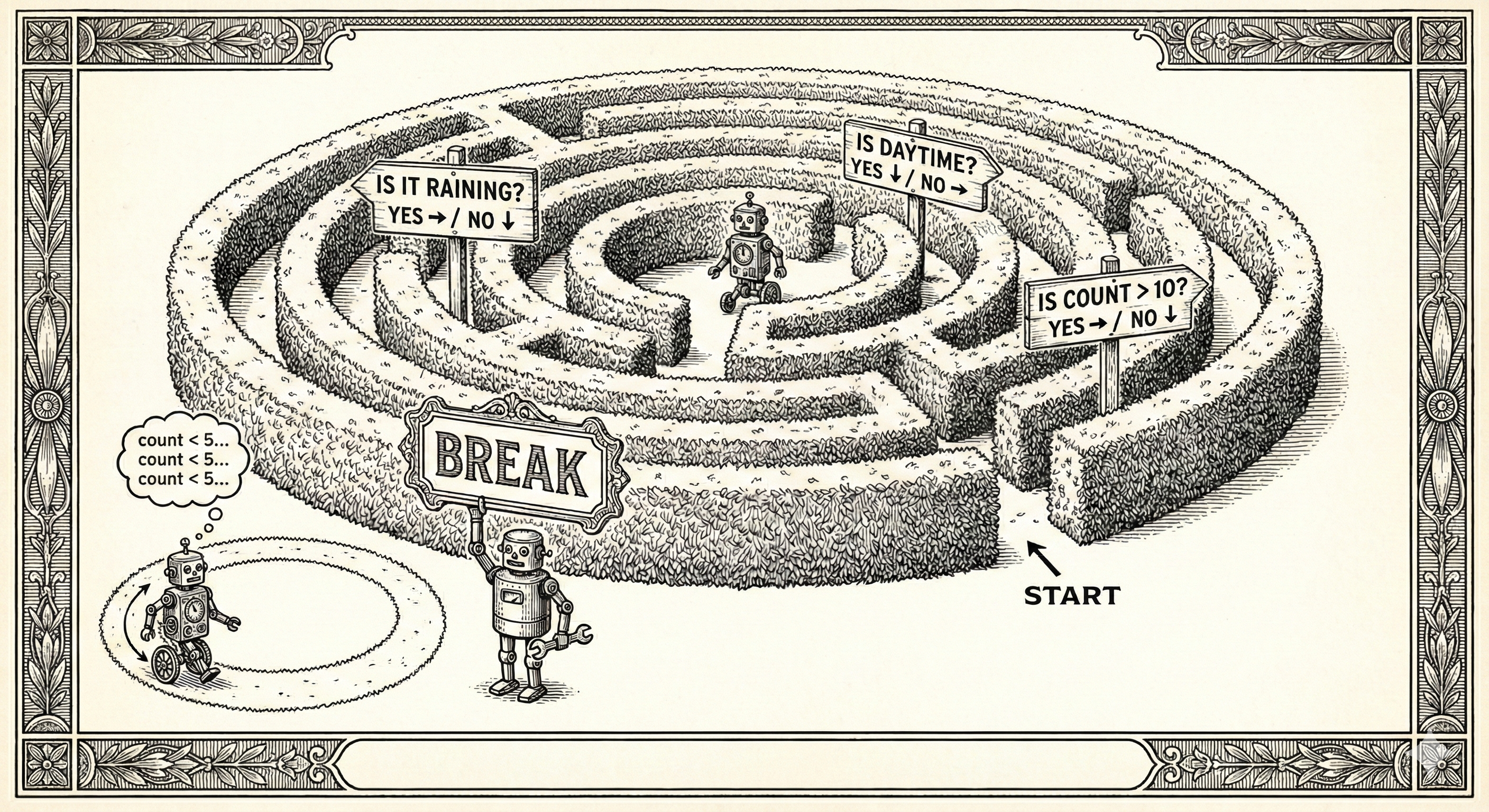
}When tracing code with guard clauses, if you hit a condition that returns early, you’re done. The rest of the function doesn’t execute. This makes tracing simpler, with fewer nested levels to track mentally. Research suggests that we humans struggle to follow more than three levels of nested conditionals without losing track of which condition we’re inside. Guard clauses keep code flat, like a gated garden rather than a bewildering multi-storey maze where each floor has its own floor plan and none of the staircases quite connect.
When Loops Need an Emergency Exit
Occasionally a loop must terminate before its natural conclusion. The break statement serves as the emergency exit. And sometimes one wishes to skip the remainder of the current iteration while continuing the loop. For this, continue.
Consider break as declaring “I am finished with this whole series,” while continue declares “I am finished with this particular episode, but bring me the next.”
# break: stop the whole loop
for num in range(10):
    if num == 5:
        break
    print(num)  # Prints 0, 1, 2, 3, 4

# continue: skip this iteration
for num in range(5):
    if num == 2:
        continue
    print(num)  # Prints 0, 1, 3, 4
// break: stop the whole loop
for (let num = 0; num < 10; num++) {
if (num === 5) break;
console.log(num); // Prints 0, 1, 2, 3, 4
}
// continue: skip this iteration
for (let num = 0; num < 5; num++) {
if (num === 2) continue;
console.log(num); // Prints 0, 1, 3, 4
}When tracing loops with break or continue:
break: Jump immediately out of the loop, skipping all remaining iterationscontinue: Skip the rest of this iteration’s code, jump back to check the loop condition
Both alter the flow in ways that can surprise you if you’re not paying attention.
Weaving It Together
Real programs combine sequences, conditionals, and loops. Trace through this interactive program to see how state changes control flow.
The computer is never wrong, in the sense that it always does exactly what you told it to do. But what you told it to do and what you thought you told it to do are sometimes very different things. Tracing is the process of discovering what you actually said.
FizzBuzz: The Classic Challenge
For each number from 1 to 15: if divisible by 3, say “Fizz”. If divisible by 5, say “Buzz”. If both, say “FizzBuzz”. Otherwise, say the number. You can write it in pseudocode but try it yourself.
The Power You Now Have
With the ability to trace sequential execution, conditionals, and loops, you can read and understand programs of genuine complexity:
- Decision-making based on input
- Processing collections of data
- Responding to changing conditions
- Interactive systems
- Game logic
- Automated tasks
Every program ever used (from web browsers to video games to the operating system running beneath it all) is constructed from these same fundamental building blocks. The difference between a five-line script and a million-line operating system is merely one of scale and clever arrangement (practiced as the art of abstraction).
What’s Next
You can now trace what programs do. You understand how the computer makes its way through code, line by line, decision by decision, loop by loop.
This skill becomes invaluable when working with AI. When Claude or another AI assistant generates code for you, you won’t just run it and hope. You’ll trace through it mentally, checking each path, verifying each loop terminates, ensuring each conditional makes sense.
In the next chapter, we’ll explore that collaboration directly: how to work with AI as your pair programmer, how to describe what you want, how to verify what you get, and how to fix it when things go sideways.
Next: Your New Colleague—working with AI to write and improve code.